Discord Bot Development
The Discord Bot module provides an intuitive Discord interface for the PEON platform using modern Discord.py v2 features.
✅ STABLE RELEASE (v3.0.0)
🎯 Design Objectives
- User-Friendly: Non-programmer accessible interface
- Modern: Discord.py v2 with slash commands
- Intuitive: Smart auto-completion and context awareness
- Responsive: Fast, reliable server management
- Safe: Confirmation dialogs for destructive actions
🏗️ Software Stack
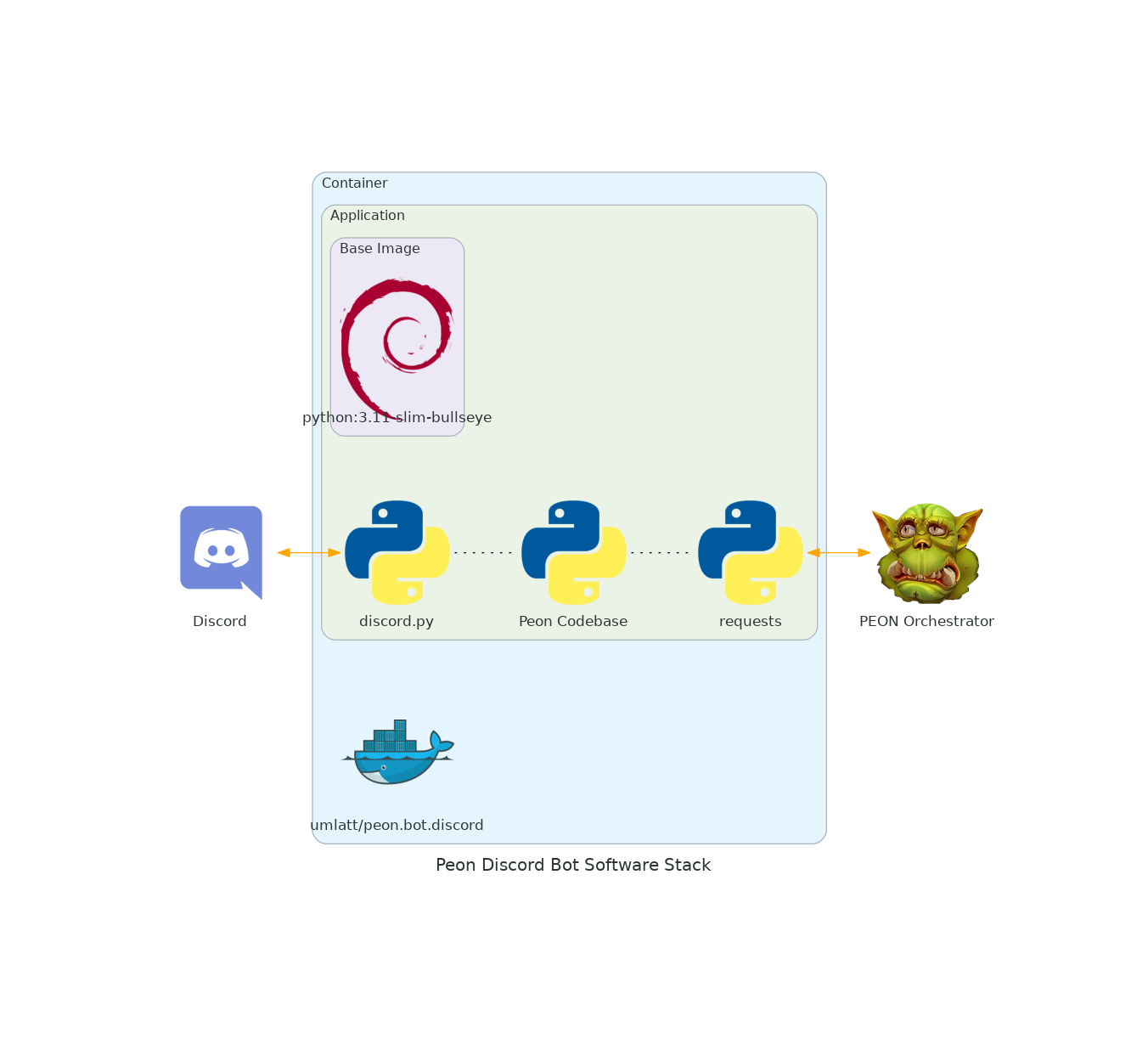
Core Technologies: - Discord.py v2.0+: Modern Discord API wrapper - Python 3.11+: Async/await patterns - Docker: Containerized deployment - REST API: Communicates with PEON Orchestrator
Key Libraries:
- discord.py - Discord API interaction
- requests - HTTP API communication
- asyncio - Asynchronous operations
- logging - Comprehensive error tracking
🚀 Features
✅ Completed
- Modern Slash Commands: Full Discord.py v2 implementation
- Interactive UI: Buttons, modals, dropdowns, persistent views
- Auto-Completion: Smart suggestions for all commands
- Server Management: Start, stop, restart, update, backup operations
- Administrator Interface: Orchestrator management, server creation
- Enhanced Error Handling: Clear, actionable error messages
- Safety Features: Confirmation dialogs for destructive actions
- Legacy Support: Graceful migration from prefix commands
- Debug Tools: Connection testing and diagnostics
- Resource Optimization: Efficient API usage and caching
🔄 In Progress
- Advanced Scheduling: Recurring server operations
- User Permission System: Role-based access control
- Webhook Integration: External service notifications
- Custom Embeds: Personalized server status displays
📋 Roadmap
- Multi-Language Support: Internationalization
- Advanced Analytics: Server usage statistics
- Plugin System: Extensible functionality
- Voice Channel Integration: Voice-activated commands
📊 Architecture Overview
graph TB
    subgraph "Discord Bot"
        A[Command Handler]
        B[UI Components]
        C[Event System]
    end

    subgraph "Core Modules"
        D[Administrator]
        E[User Interface]
        F[Orchestrator Client]
        G[Shared Components]
    end

    subgraph "External Services"
        H[Discord API]
        I[PEON Orchestrator]
        J[Container Runtime]
    end

    A --> D
    A --> E
    B --> G
    C --> G
    D --> F
    E --> F
    F --> I
    A --> H
    I --> J
Component Details
Command Handler (main.py):
- Slash command registration and routing
- Auto-completion providers
- Error handling and logging
- Legacy command migration
Administrator Module (administrator.py):
- Orchestrator registration/management
- Server creation workflows
- System monitoring and diagnostics
- Advanced configuration options
User Interface Module (user.py):
- Server-specific controls
- Interactive button panels
- Modal forms for input
- Confirmation dialogs
Orchestrator Client (orchestrator.py):
- REST API communication
- Response parsing and error handling
- Connection pooling and retry logic
- API key management
Shared Components (shared.py):
- Common UI builders
- Utility functions
- Configuration management
- Interaction cleanup
🔧 Development Setup
Local Development
# Clone repository
git clone https://github.com/the-peon-project/peon-bot-discord.git
cd peon-bot-discord

# Setup Python environment
python -m venv venv
source venv/bin/activate  # Linux/Mac
venv\Scripts\activate     # Windows

# Install dependencies
pip install -r requirements.txt

# Configure environment
cp .env.example .env
nano .env  # Add your Discord token and settings

# Run development server
python app/main.py
Docker Development
# Build development image
docker build -t peon-bot-dev .

# Run with live reload
docker run -d \
  --name peon-bot-dev \
  -e DISCORD_TOKEN=your_token \
  -e LOCAL_API_KEY=your_key \
  -v $(pwd)/app:/app \
  peon-bot-dev
Testing Discord Bot
- Create Discord Application:
- Go to Discord Developer Portal
- Create new application
-
Add bot with required permissions
-
Set up Test Server:
- Create Discord server for testing
- Invite bot with admin permissions
-
Create test channels for different scenarios
-
Test Command Flow:
📝 API Integration
Orchestrator Communication
The bot communicates with PEON Orchestrator via REST API:
# Example API call structure
def server_create(url, api_key, game_uid, warcamp_name, user_settings={}):
    server_uid = f"{game_uid}.{warcamp_name}"
    endpoint_url = f"{url}/api/v1/server/create/{server_uid}"
    headers = {'Accept': 'application/json', 'X-Api-Key': api_key}
    body = {"game_uid": game_uid, "warcamp": warcamp_name, **user_settings}

    response = requests.put(endpoint_url, headers=headers, json=body)
    response.raise_for_status()
    return {"status": "success", "data": response.json()}
Error Handling Patterns
# Comprehensive error handling
try:
    result = orchestrator_api_call()
    if result['status'] == 'success':
        # Handle success
        embed = build_success_embed(result['data'])
    else:
        # Handle API-level errors
        embed = build_error_embed(result['message'])
except requests.exceptions.RequestException as e:
    # Handle network/HTTP errors
    embed = build_error_embed(f"Connection failed: {str(e)}")
except Exception as e:
    # Handle unexpected errors
    logging.error(f"Unexpected error: {e}")
    embed = build_error_embed("An unexpected error occurred")
🎨 User Interface Design
Modern Discord Components
Slash Commands:
@bot.tree.command(name="create", description="🏗️ Create a new game server")
@app_commands.describe(
    game_type="Type of game server to create",
    server_name="Name for the new server"
)
@app_commands.autocomplete(game_type=game_type_autocomplete)
async def create_server(interaction, game_type: str, server_name: str):
    # Implementation
Interactive Buttons:
@discord.ui.button(label="🚀 Start", style=discord.ButtonStyle.success)
async def server_start(self, interaction, button):
    # Handle server start with visual feedback
Auto-completion:
async def server_autocomplete(interaction: discord.Interaction, current: str):
    servers = get_user_servers()
    return [
        app_commands.Choice(name=server['name'], value=server['uid'])
        for server in servers if current.lower() in server['name'].lower()
    ][:25]  # Discord limit
Enhanced Visual Feedback
- Status Emojis: 🟢 Running, 🔴 Stopped, 🟡 Starting
- Action Icons: 🚀 Start, 🛑 Stop, 🔄 Restart, ⬆️ Update
- Risk Indicators: ⚠️ Medium Risk, 🚨 High Risk, ✅ Safe
- Progress Indicators: Loading states and confirmation messages
🔐 Security Considerations
API Key Management
# Secure API key handling
API_KEY = os.environ.get('LOCAL_API_KEY')
if not API_KEY:
    logging.critical("API key not configured")
    sys.exit(1)

# Per-request header injection
headers = {'Accept': 'application/json', 'X-Api-Key': API_KEY}
Input Validation
# Server name validation
if not re.match(r'^[a-zA-Z0-9._-]+$', server_name):
    return await interaction.followup.send(
        embed=build_error_embed("Invalid server name format")
    )

# Command parameter sanitization
game_type = game_type.lower().strip()
server_name = server_name.lower().replace(' ', '_')
Permission Checking
# Discord permission verification
if not interaction.channel.permissions_for(interaction.user).administrator:
    return await interaction.followup.send(
        embed=build_error_embed("Administrator permissions required"),
        ephemeral=True
    )
📊 Performance Optimization
Async Best Practices
# Efficient async operations
async def batch_server_status():
    tasks = []
    for server in servers:
        task = asyncio.create_task(get_server_status(server))
        tasks.append(task)

    results = await asyncio.gather(*tasks, return_exceptions=True)
    return process_results(results)
Caching Strategy
# Response caching for frequently accessed data
from functools import lru_cache
from datetime import datetime, timedelta

@lru_cache(maxsize=100)
def get_cached_plans(timestamp):
    # Cache plans for 5 minutes
    return fetch_plans_from_api()

def get_plans():
    now = datetime.now()
    timestamp = int(now.timestamp() // 300) * 300  # 5-minute intervals
    return get_cached_plans(timestamp)
Rate Limit Handling
# Discord API rate limiting
from discord.ext import tasks

@tasks.loop(seconds=1)
async def process_queue():
    if command_queue and not rate_limited:
        command = command_queue.pop(0)
        await execute_command(command)
📋 Release Notes
v3.0.0 - Modern Discord Interface
🎉 MAJOR RELEASE - Complete Modernization
✨ New Features
- Slash Commands: Complete migration from prefix commands
- Enhanced UI: Buttons, modals, dropdowns, and persistent views
- Auto-Completion: Smart suggestions for all command parameters
- Interactive Management: Point-and-click server administration
- Safety Features: Confirmation dialogs for destructive operations
- Debug Tools: Built-in diagnostics and troubleshooting
- Legacy Migration: Graceful transition from old command format
🛠️ Technical Improvements
- Discord.py v2: Modern async/await patterns
- Performance: Optimized API usage and response times
- Error Handling: Comprehensive error messages and recovery
- Logging: Enhanced debugging and monitoring capabilities
- Code Quality: Complete rewrite with modern best practices
🐛 Bug Fixes
- Fixed interaction timeout issues
- Resolved message cleanup problems
- Corrected permission checking logic
- Improved API error handling
- Fixed auto-completion edge cases
v2.0.0 - Enhanced Bot Behavior
⚡ IMPACT RELEASE
- ✅ Server Deployment: Create servers directly from Discord
- ✅ Orchestrator Management: Register/deregister orchestrators
- ✅ Granular Updates: Server/image/full/reinit update modes
- ✅ Import System: Discover and import existing servers
- ✅ Enhanced UI: Card-based responses with rich formatting
- ✅ Admin Controls: Channel-based permission system
- ✅ Version Info: Dynamic version reporting from components
v1.2.x - Stability and Features
- ✅ API Key Management: Dynamic API key updates
- ✅ Container Info: Version and type reporting
- ✅ Port Management: Usage tracking and assignment
- ✅ Plan System: Dynamic game plan fetching
- ✅ Timer Improvements: Enhanced scheduling system
- ✅ Error Handling: Better error messages and recovery
v1.0.x - Foundation
- ✅ Core Functionality: Basic server control (start/stop/restart)
- ✅ Multi-Server: Support for multiple game servers
- ✅ Timer System: Scheduled server operations
- ✅ Discord Integration: Message-based interface
🔗 Development Resources
Documentation
Related Components
- PEON Orchestrator - API backend
- Container Runtime - Game server execution
- Game Plans - Server templates
Project Links
1.2.6
- CHANGE
 Built on the latest python/package codebase
1.2.5
- CHANGE Updated to latest OS/package combinations.
1.2.4
- TYPO
 Fixed a bad response example in
 !usagecommand
1.2.3
- ADDED
 Usage response
1.2.2
- ADDED Update game server command.
1.2.1
- BUGFIX Fixed an issue with the regex matching for a minute interval (would match any possible string)
1.2.0
 IMPACT RELEASE
- CHANGED Added language localization. Completely re-wrote messaging language module.
- CHANGED Moved localization files to
/app/reference/ - CHANGED Moved from
/api/1.0to/api/v1 - ADDED Get a list of available game plans
1.1.0
IMPACT RELEASE
- CHANGED Moved logging into container logs
- ADDED Added
DEV_MODEflag to enable/disable logging/dev mode.
1.0.1
- BUGFIX Auto append minute time unit to request, if no time unit is provided.
1.0.0
- CHANGED Improved data response legibility on get.
- CHANGED Updated bot to handle changes to the Orc API (since Orc release v1.0.1)
- REMOVED
 Removed
 dev_modeswitch
IMPACT RELEASE
0.2.8
- CHANGED Messaging - Reworked error messages
- BUGFIX Scheduling past event times.
0.2.7
- ADDED Added shutdown scheduler
0.2.6
- CHANGED Better natural language support
0.2.5
- ADDED Added aliases for commands
0.2.2
- CHANGED Reformatted info in the message feed
- ADDED Server_Config - Allowed for json formatted content
0.2.1
- ADDED Discord - Added message cleaner
clear [int]
0.2.0
- ADDED Orc - control start/stop/restart
0.1.1
- ADDED Added devMode switch
0.1.0
- ADDED First version of the bot
- ADDED Basic get-all/get the functionality
- SECURITY
 Hardcoded bot key
0.0.0
- INITIALISED
 Initial commit