🛠️ Developer Documentation
Complete development guide for contributing to and extending the PEON project.
!!! info "Developer Community" Join our Discord development channel for real-time collaboration and support!
🚀 Quick Start for Developers
Development Environment Setup
-
Clone the repository
git clone https://github.com/the-peon-project/peon.git cd peon -
Install dependencies
# Docker and Docker Compose required sudo apt-get install docker.io docker-compose git # Add user to docker group sudo usermod -aG docker $USER -
Start development environment
# Deploy PEON stack ./deploy_peon.sh # Verify installation docker ps -
Access development tools
- Orchestrator API:
http://localhost:5000 - Web UI:
http://localhost:3000 - Documentation:
http://localhost:8000
First Contribution
- Architecture Overview - Understand the system design
- Local Development - Set up your environment
- API Development - Work with the REST API
- Discord Bot - Extend Discord functionality
- Game Integration - Add new game support
📐 System Architecture
PEON uses a modular microservices architecture designed for scalability and maintainability.
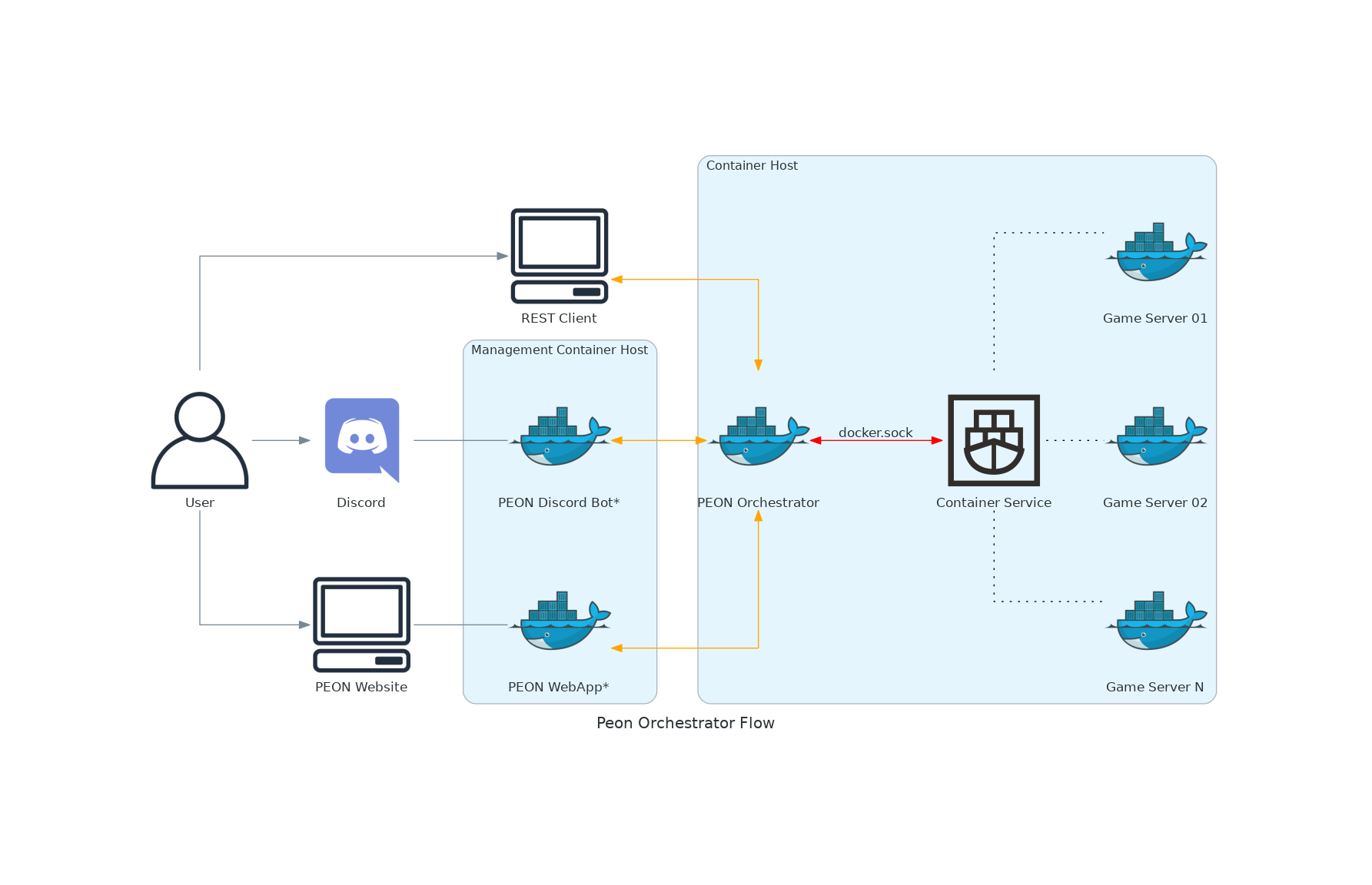
Core Components
| Component | Purpose | Technology |
|---|---|---|
| Orchestrator | Core API and server management | Python, FastAPI |
| Discord Bot | User interface and notifications | Python, Discord.py v2 |
| Web UI | Browser-based management console | FastAPI, React, nginx |
| War Table | Shared services and infrastructure | Docker, Docker Compose |
| War Plans | Game server configurations | JSON, Shell scripts |
Communication Flow
- 🟠 REST API - HTTP/JSON communication between components
- 🔴 Docker Socket - Container management and monitoring
- 🟢 Discord Gateway - Real-time Discord integration
- 🔵 WebSocket - Live updates in web interface
🏗️ Development Guides
Backend Development
Core Services
- Orchestrator Development - Main API service
- War Table Services - Shared infrastructure
- Authentication & Security - API security implementation
Integration Development
- Discord Bot Extensions - Add new Discord commands
- Web UI Features - Browser interface development
- Webhook System - External service integration
Frontend Development
User Interfaces
- Discord Bot UI - Slash commands and interactions
- Web Dashboard - Browser-based management
- API Documentation - Developer-facing docs
Game Integration
- War Plan Creation - New game server recipes
- Container Images - Custom game containers
- Configuration Schemas - Game-specific settings
🔧 Development Tools
Code Quality
# Python linting and formatting
pip install black flake8 mypy
black . --check
flake8 .
mypy .

# JavaScript/TypeScript (Web UI)
npm install eslint prettier
npm run lint
npm run format
Testing Framework
# Unit tests
python -m pytest tests/

# Integration tests
python -m pytest tests/integration/

# End-to-end tests
python -m pytest tests/e2e/
Debugging Tools
# Enable debug mode
export PEON_DEBUG=true

# View logs
docker logs peon-orchestrator
docker logs peon-discord-bot

# Interactive debugging
python -m pdb app/main.py
📚 Code Standards
Python Style Guide
- PEP 8 compliance with 88-character line limit
- Type hints required for all public functions
- Docstrings following Google style
- Error handling with custom exception classes
from typing import List, Optional
import logging

logger = logging.getLogger(__name__)

class ServerNotFoundError(Exception):
    """Raised when specified server cannot be found."""
    pass

async def get_server(server_id: str) -> Optional[GameServer]:
    """Retrieve server by ID.

    Args:
        server_id: Unique server identifier

    Returns:
        GameServer instance or None if not found

    Raises:
        ServerNotFoundError: If server doesn't exist
    """
    try:
        return await db.get_server(server_id)
    except KeyError:
        logger.error(f"Server not found: {server_id}")
        raise ServerNotFoundError(f"Server {server_id} not found")
Git Workflow
# Feature development
git checkout -b feature/discord-slash-commands
git add .
git commit -m "feat: add server management slash commands"
git push origin feature/discord-slash-commands

# Create pull request via GitHub
# Automated testing runs on PR creation
Commit Message Format
type(scope): brief description

[optional body]

[optional footer]
Types: feat, fix, docs, style, refactor, test, chore
Scopes: api, discord, webui, docs, tests
🎮 Game Development
Adding New Games
- Research requirements
- Server software and dependencies
- Configuration options and defaults
- Network ports and protocols
-
Resource requirements
-
Create war plan
cd peon-warplans mkdir my-game cp template/plan.json my-game/ # Edit configuration -
Test deployment
# Local testing ./deploy_peon.sh # Create test server via API curl -X POST localhost:5000/api/v1/servers \ -H "Content-Type: application/json" \ -d '{"name":"test","game":"my-game"}' -
Submit for review
git add peon-warplans/my-game/
git commit -m "feat: add support for My Game"
git push origin feature/my-game-support
Container Development
Custom game containers for complex deployments:
# Example game server container
FROM ubuntu:20.04

# Install game server
RUN apt-get update && apt-get install -y \
    game-server-package \
    && rm -rf /var/lib/apt/lists/*

# Configure server
COPY config/ /opt/gameserver/config/
COPY entrypoint.sh /entrypoint.sh

EXPOSE 7777/udp
ENTRYPOINT ["/entrypoint.sh"]
🧪 Testing Strategy
Unit Testing
import pytest
from app.services import GameServerService

@pytest.fixture
def server_service():
    return GameServerService()

@pytest.mark.asyncio
async def test_create_server(server_service):
    """Test server creation with valid parameters."""
    server = await server_service.create_server(
        name="test-server",
        game="valheim"
    )

    assert server.name == "test-server"
    assert server.game == "valheim"
    assert server.status == "creating"
Integration Testing
import httpx
import pytest

@pytest.mark.integration
async def test_api_server_lifecycle():
    """Test complete server creation, start, stop cycle."""
    async with httpx.AsyncClient(base_url="http://localhost:5000") as client:
        # Create server
        response = await client.post("/api/v1/servers", json={
            "name": "integration-test",
            "game": "valheim"
        })
        assert response.status_code == 201
        server_id = response.json()["id"]

        # Start server
        response = await client.post(f"/api/v1/servers/{server_id}/start")
        assert response.status_code == 200

        # Stop server
        response = await client.post(f"/api/v1/servers/{server_id}/stop")
        assert response.status_code == 200
📖 Reference Materials
Terms & Definitions
| Term | Definition |
|---|---|
| Orchestrator | Core API service managing game servers |
| War Table | Shared infrastructure and container services |
| War Plan | Game server configuration and deployment recipe |
| Web UI | Browser-based management interface |
| War Camp | Docker host running PEON services |
| War Chief | Multi-cluster management component |
Development Symbols
Used throughout changelogs and documentation:
| Symbol | Meaning | Usage |
|---|---|---|
| :zap: | Impact Release | Breaking changes across multiple components |
| :airplane: | Project Init | New project or major component added |
| :new: | Feature Added | New functionality implemented |
| :bug: | Bug Fixed | Issue resolved |
| :books: | Documentation | Docs updated or improved |
| :art: | Code Quality | Refactoring, performance, or style improvements |
API Versioning
| Version | Status | Features | End of Life |
|---|---|---|---|
| v1.0 | Stable | Basic server management | Active |
| v1.1 | Beta | Advanced monitoring | 2024 Q2 |
| v2.0 | Planning | Multi-cluster support | 2024 Q3 |
🤝 Contributing
Development Process
- Join the community - Discord development channel
- Pick an issue - Check GitHub Issues
- Set up environment - Follow development setup
- Create feature branch - Use descriptive branch names
- Write tests - Maintain high code coverage
- Submit PR - Include detailed description and testing notes
- Code review - Collaborate with maintainers
- Deploy and celebrate 🎉
Contribution Types
| Type | Examples | Getting Started |
|---|---|---|
| Bug Fixes | Fix API errors, UI issues | Good First Issues |
| New Games | Add game server support | War Plan Guide |
| Features | Discord commands, API endpoints | Feature Requests |
| Documentation | Guides, API docs, tutorials | Doc Issues |
Recognition
Active contributors receive:
- GitHub contributor badge
- Discord contributor role
- Special thanks in releases
- Priority support for their projects
🆘 Development Support
Getting Help
- Discord #dev-support - Real-time help
- GitHub Discussions - Architecture questions
- Stack Overflow - Code-specific questions
Useful Resources
- Development Wiki - Additional guides
- API Reference - Complete API documentation
- Discord.py Documentation - Discord bot framework
- Docker Documentation - Container development
Ready to contribute? Set up your development environment →
| CHANGED | :tools: :tools: | When a modification to the existing codebase/architecture has been carried out |
| OPTIMISED | :alarm_clock: :alarm_clock: | When a portion of the codebase has been improved visually or with regards to performance |
| REMOVED | :scissors: :scissors: | When something is removed/cut from the codebase |
| BUGFIX | :beetle: :beetle: | When a bug has been identified and resolved |
| LOGGING| :speech_balloon: :speech_balloon: | When logging is added/enhanced/improved |
| TESTED | :pencil: :pencil: | When a test task is planned & executed |
| SECURITY | :unlock: :unlock: | When some security modifications have been added |
| BLOCKED | :no_entry_sign: :no_entry_sign: | When something is stuck due to external requirements |
Tools & Technologies
Below, is a list of the various tools and technologies leveraged in the development process for the PEON project.
ASCII Text Art Style
Things like the motd file will use the ascii text art style Delta Corps Priest 1. A nice alternative (non-ansi) is Elite
Documentation
Material for MkDocs
We are using mkdocs-material as the basis for our documentation framework, as it is markdown compliant and requires minimal maintenance to provide aesthetically pleasing documentation.
Logo/Symbol Search
If you need to find a logo/symbol that exists in the mkdocs-material platform a useful link is here
Diagram Design
Python Diagrams
We are using the diagrams module for Python. It offers the ability to dynamically generate diagrams programmatically. There is a built-in (Material for MkDocs) programmatic diagram software, however, initial investigations did not appear to provide as aesthetic a design as Python Diagrams